
Tuesday, September 18, 2012


Saturday, September 15, 2012
Few commands that can save your time
Here i am listing few commands that i am using. I am sure it will be helpful.
2. VIM coomands
3. PHP Codebase Reports
1. Create UML from PHP code. ( annoying and little bit hacky but works well :P)
- sudo phpuml ~/shiksha/trunk/LDB/controller/LDB_Server.php -f htmlnew -o ~/Desktop/ -x 1 -n ldb -m *.php6 -i .svn
- sudo phpuml ~/shiksha/trunk/CodeIgniter/ -o ~/Desktop/ -x 1 -n Foo -m *.php6 -i .svn
2. VIM coomands
- zz save and exit
- ? search backword
- p command for paste
- ma mark then can use "d'a" to delte entire
- y for copy [can do same y'a or yy ]
- :split to open other file
- CTRL ww to jump file
- > move to right
- ZZ save and exit
- ZQ exit without save
- :tabs - View a list of tabs that are open with the file names. Use the command ':tabs' and Vim will display a list of all the files in the tabs. The current window is shown by a ">" and a "+" is shown for any modifiable buffers.
- :tabc - Close the current tab.
- :tabnew - Open a new file for editing in a separate tab.
- :tab split - Open the file in the current buffer in a new tab page.
- :tabn - Switching to the next tab page.
- :tabp - Switch to the previous tab page.
- :tabr[ewind] - Go to the first tab page. You get the same effect when you use the :tabf[irst] command.
- :tabo - Close all other tab pages.
3. PHP Codebase Reports
phploc --count-tests /usr/local/src/ezcomponents/trunk/Workflow
phpmd /path/to/source text codesize,unusedcode,naming
sudo php_beautifier -l "Pear()" svrSearch.php svrSearch_n.php
php_beautifier -l "Pear(add_header=apache) ArrayNested() ListClassFunction()" index.php index_new.php
4. SYSTEM INFO
Current Sort Field: K for window 1:Def
Select sort field via field letter, type any other key to return
{
ps aux | grep "$1" | grep -v 'grep'
}
function psterm ()
{
[ ${#} -eq 0 ] && echo "usage: $FUNCNAME STRING" && return 0
local pid
pid=$(ps ax | grep "$1" | grep -v grep | awk '{ print $1 }')
echo -e "terminating '$1' / process(es):\n$pid"
kill -SIGTERM $pid
}
phpmd /path/to/source text codesize,unusedcode,naming
sudo php_beautifier -l "Pear()" svrSearch.php svrSearch_n.php
php_beautifier -l "Pear(add_header=apache) ArrayNested() ListClassFunction()" index.php index_new.php
4. SYSTEM INFO
- netstat -antp | awk '{print $6}' | sort | uniq -c | sort -rn
- netstat -antp | awk '{print $5}' | cut -d: -f1 | sort | uniq -c | > sort -rn
- ps -e -o vsz | awk '{size += $1}END{print(size)}'
- iostat -x -d
- vmstat 5
- top -bn1
- ps -auxf | sort -nr -k 4 | head -10
- ps -auxf | sort -nr -k 3 | head -10
- kill $(ps aux | grep 'MailQueueRecordsMass' | awk '{print $2}')
- echo stats | nc 127.0.0.1 11211
- watch "echo stats | nc 127.0.0.1 11211"
- watch 'php -r '"'"'$m=new Memcache;$m->connect("127.0.0.1", 11211);print_r($m->getstats());'"'"
- netstat -antp
- top -bn1
- free -m
- ps -e -o vsz | awk '{size += $1}END{print(size)}'
- mpstat -P ALL 5
- find /home/tmp/ -name '*.html' -print0 | xargs -0 rm -f
- free -mto
- top
Current Sort Field: K for window 1:Def
Select sort field via field letter, type any other key to return
- ps aux | more
- ps axuf
- ps U $USER
{
ps aux | grep "$1" | grep -v 'grep'
}
function psterm ()
{
[ ${#} -eq 0 ] && echo "usage: $FUNCNAME STRING" && return 0
local pid
pid=$(ps ax | grep "$1" | grep -v grep | awk '{ print $1 }')
echo -e "terminating '$1' / process(es):\n$pid"
kill -SIGTERM $pid
}
- find ./ -type f -name \*.php -exec php -l {} \;
- # how many mysql connections
- netstat -n -a |grep 3306
- ps ax | grep sshd
- netstat -ln | grep 22
- grep -ril john /root
- find /etc -name "*mail*" [name start mail]
- find / -type f -size +100M [ size more than 100 MB]
- find . -mtime +60 [ more than 60 days]
- find . –mtime -2 [ last 2 days]
- cat file.txt > /dev/null [only error]
- cat invalid-file-name.txt 2> /dev/null [only output no error]
- find / -name *.jpg -type f -print | xargs tar -cvzf images.tar.gz
- cat url-list.txt | xargs wget –c
- /sbin/ifconfig -a
- df -h
- df -Tha
- du -sh ~
- find /var/log -type f -size +100000k -exec ls -lh {} \; | awk '{ print $9 ": " $5 }'
4. SVN REPORT
java -jar statsvn.jar searchAgents/logfile.log
searchAgents/ -output-dir svnreport/
5. SQL to get database table size
5. SQL to get database table size
SELECT TABLE_SCHEMA AS 'Database', TABLE_NAME AS 'Table',
CONCAT(ROUND(((DATA_LENGTH + INDEX_LENGTH - DATA_FREE) / 1024 /
1024),2)," MB") AS Size FROM INFORMATION_SCHEMA.TABLES where
TABLE_SCHEMA like '%mailer%';
6. SVN
- svn delete $( svn status | sed -e '/^!/!d' -e 's/^!//' )
- svn add $( svn status | sed -e '/^?/!d' -e 's/^?//' )
- svn resolve $( svn st | grep "^C" | awk '{print $2}' )
- svn add * --force find ./ -type f -name \*.php -exec php -l {} \;
- find ./ -type f -name \*.php -exec php -l {} \; | grep "Errors parsing "; //-not -regex '.*/.svn/*.*'
- find . -name .svn -print0 | xargs -0 rm -rf find -type d -name '.svn' -exec rm -rfv {} \;
- svn log | sed -n '/raviraj/,/-----$/ p' svn log -v --use-merge-history URL/branches/Branch01
Number of bugs being filed is very high
We have discussed last week about total number of bug count and how can we reduce bugs. It was an open discussion, and I really enjoyed people's comments.
Few major reasons described by people are:
- UI Issues
- Legacy code issue/Existing functionality issues
- KLOC rule/BUGS per 1000 LOC
- Bug logging categorization ( one bug but reported many times )
- Strict timeline
- Lack of proper unit testing/integration testing cycle
- Lack of impact area analysis
Before discussing on these points in detail let's have a look on what is actual meaning of "so many bugs".
One hair in soup is too many and in head too few. It all depends. There is no context to judge it. Firefox's each release contains about 1000 open bugs, but it is considered to be quite usable.
Perception of the quality of a product can vary greatly between the programmer and other user. Developers and users/business people have very different views of what bugs mean. For a developer, every bug found and fixed increases the developer's confidence in the code, since it is getting more robust. For a user, every bug found (even if fixed) decreases their confidence.
If you are judging only by the bug count found in testing, then that is unfortunate.
I have seen may products which are judged on the basis of user's experience and it plays a big role however there were no bugs are reported from QA end.
Few products were reported as buggy (from product due to complexity of product) but they are generating good percentage amount of revenue and running smoothly however no bugs are reported from QA end.
Sometimes End user reported few issues which are basically marked as missing features most of times and in few cases it was closed due to wrong manipulation of data analysis.
In few cases such bugs were closed by providing data in Excel to client or closed by discussion with sales person and clients.
UI Issues: I believe that HTML developer provide W3C validated HTML code and HTML also verified via QA Team. Developer when integrate HTML, code will become buggy.
There are many reasons for UI issues.
Developer avoid cross browser testing with all versions of browses.(see browser plus OS matrix)
Sometimes developers write own front-end logic which is already written and cross checked but newly written code fails as per standard that follow through out website.
KLOC rule/BUGS per 1000 LOC reason is not fit in our case(website development) because if we look into codebase and nature of bugs 60-80 % of code lines were captured by HTML of code associated with front-end page rendering logic.
Another point is in house testing is not also so much focusing on security testing, environmental issues or load and performance testing.
Some times we have contributed more by removing code than adding ;-)
In our last release we spent good amount of time to discover that code required pdo_mysql extension and few code APIs are behaving unexpected results in 64 bit machine.
Here bootstrap plays a powerful role. https://github.com/twitter/bootstrap (Bootstrap is a sleek, intuitive, and powerful front-end framework for faster and easier web development.)
Lets start look seriously at front-end part, try to avoiding unmoduler JS and HTML codebase.
Legacy code issue/Existing functionality issues :
Always Fix bugs before write new code and mark such bugs with a new tag in bugzilla.
see here http://www.joelonsoftware.com/articles/fog0000000043.html
Lack of impact area analysis:
It might be that the requirements weren't clear or correct, and that was reflected in the code and picked up by the testers.
Failure mode and effects analysis should be a part of designing.
Some how we can say we should follow more tighter software development processes. During writing code, always think in mind that we are building software of medical or military environment.
Other important areas are Static code checking, peer code reviews, unit testing, component testing, system tests. It's easy to get a couple of hundred lines of code per day but try to get a couple of hundred quality lines of code per day and it's not so easy.
Saturday, July 7, 2012
Mobile site development
Hope you guys have seen https://www.facebook.com/photo.php?fbid=4202617702930&set=a.1341388773995.2051896.1209474754&type=1&theater this!!!
Pic tells thousand words and showing developer pain while he/she suffered in mobile website development.
Actually there are so many tools available but still there are few doubts/questions which are still unanswered like
1. Mobilre App Vs Mobile website
2. SEO impact m subdomain or mobi domain or same domain with same URL
3. Traffic and devices
Mobile is not as much powerful as desktop like RAM, Memory internet speed and even hardware support. Below pic describes why delay occurred in mobile internet communication.

Browser Connection Limits. its 4 on Android 2.3.5 and 6 on Android 4.0.4 Ice Cream Sandwich.

Here us limitation chart.

Also mobile browsers caches is very small.

So Main Reasons for slow.
Pic tells thousand words and showing developer pain while he/she suffered in mobile website development.
Actually there are so many tools available but still there are few doubts/questions which are still unanswered like
1. Mobilre App Vs Mobile website
2. SEO impact m subdomain or mobi domain or same domain with same URL
3. Traffic and devices
Mobile is not as much powerful as desktop like RAM, Memory internet speed and even hardware support. Below pic describes why delay occurred in mobile internet communication.

Browser Connection Limits. its 4 on Android 2.3.5 and 6 on Android 4.0.4 Ice Cream Sandwich.

Here us limitation chart.
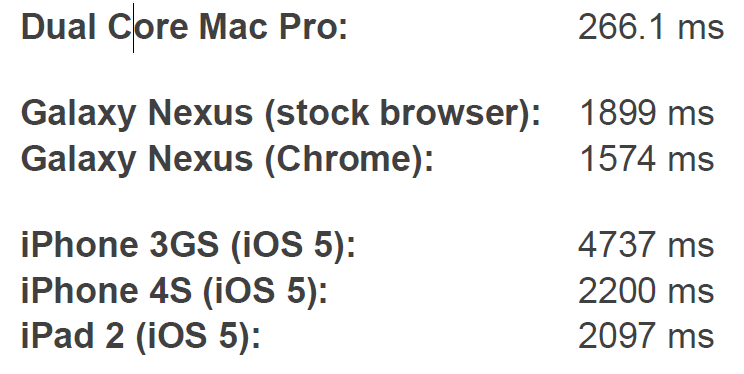
Also mobile browsers caches is very small.

So Main Reasons for slow.
- slower networks
- higher latency
- slower hardware
- different browsing experience
- different context
- different behaviors
- different possible networks
How detect mobile user in application.(WURFL)
- Read the user-agent string from the HTTP request.
- Find a
tag in the wurfl.xml file whose user_agent attribute matches - with the user-agent string.
- Look for the wml_ui capability group inside the
tag of step 2. - Check whether a capability named menu_with_select_element_recommended exists
- within the capability group of the device. If it exists, read the value of the
- capability. You've found what you were looking for, so no more processing is
- required.
- If the capability doesn't exist, follow the fall-back path. Find the
- tag whose id attribute matches with the fall_back attribute of the
tag - of step 2.
- Repeat steps 3 through 5 using the
tag of step 5. Keep repeating until - you find the menu_with_select_element_recommended capability or you reach the
- most generic
tag.
MOBILE BROWSERS
- Safari on iOS
- Android Browser
- Symbian Browser
- webOS Browser
- BlackBerry Browser
- Bada Browser
- Firefox
- Internet Explorer
- NetFront
- Myriad
- Nokia Browser (Ovi)
- Phantom
- microB
- Opera Mobile
- Opera Mini
- Skyfire
- BOLT
- Safari on iOS
- Android Browser
- webOS Browser
- BlackBerry Browser
- Opera Mini
HTML5 Magic that can help !!
- iOS 3.0+
- android 2.0+
- blackberry smartphones 5.0+
- blackberry playbook 1.0+
- webOS 1.4+
- symbian anna+
- bada 2.0
- windows phone mango+
Sunday, June 24, 2012
shebang/hashbang and Single Page Interface Good or Bad
We have noticed long URLs including # or #! in twitter and facebook. Actually # is known as The fragment identifier introduced by a hash mark # is the optional last part of a URL for a document,It is typically used to identify a portion of that document.
# behavior depends on document MIME type like in PDF, it acts in different manner.
The reason that Facebook and other Javascript-driven applications use this because they want to make pages indexable, bookmarkable and support the back button without reloading the entire page from the server. This technique is called Single Page Interface which is based on JavaScript routing.
The reason that Facebook and other Javascript-driven applications use this because they want to make pages indexable, bookmarkable and support the back button without reloading the entire page from the server. This technique is called Single Page Interface which is based on JavaScript routing.
When we use #! then it will be considered "AJAX crawlable." So suppose url is /ajax.html#!key=value then it temporarily become /ajax.html?_escaped_fragment_=key=value this is happening because
Hash fragments are never (by specification) sent to the server as part of an HTTP request so crawler needs some way to let your server know that it wants the content for the URL with #.
Hash fragments are never (by specification) sent to the server as part of an HTTP request so crawler needs some way to let your server know that it wants the content for the URL with #.
And server, on the other hand, needs to know that it has to return an HTML snapshot, rather than the normal page sent to the browser. Here snapshot is all the content that appears on the page after the JavaScript has been executed.
Other Uses except AJAX
Other Uses except AJAX
In pagination we can use #!. URLs like blog/topic/page/1 and blog/topic/page/2 etc can appear as duplicate content and google doesn't like that so maybe in this case we make hashbangs be better or just a robots no index on any page that is a pagination of another page.
Other benefit to this technique is loading page content through AJAX and then injecting it into the current DOM can be much faster than loading a new page. In addition to the speed increase, further tricks like loading certain portions in the background can be performed under the programmer's control.
Issues
With hashbang URLs, the browser needs to download an HTML page, download and execute some JavaScript, recognize the hashbang path (which is only visible to the browser), then fetch and render the content for that URL. So By removing it,we can reduce the page load time it takes.
Spiders and search indexers can and do sometimes implement JavaScript runtimes. However, even in this case there’s no well recognised way to say ‘this is a redirect’ or ‘this content is not found’ in a way that non-humans will understand.
location.hash was a way for AJAX applications to get back button and bookmarking support.
The hard part is that support for history.pushState in Internet Explorer does not appear to be forthcoming. That makes the argument that browsers are quickly adopting that feature pretty dubious since IE accounts for a good 30-40% of traffic.
Issues
With hashbang URLs, the browser needs to download an HTML page, download and execute some JavaScript, recognize the hashbang path (which is only visible to the browser), then fetch and render the content for that URL. So By removing it,we can reduce the page load time it takes.
Spiders and search indexers can and do sometimes implement JavaScript runtimes. However, even in this case there’s no well recognised way to say ‘this is a redirect’ or ‘this content is not found’ in a way that non-humans will understand.
Also code will be not maintainable unless we use some modular kind of code at front-end side (Java Script ) otherwise it will be very hard to adopt further enhancements and support existing code.
Solution
HTML 5 now introduce with pushState. it provides a way to change the URL displayed in the browser through JavaScript without reloading the page.
window.history.pushState(data, "Title", "/new-url");
In order to support the back and forward buttons we must be notified when they are clicked. we can do that using thewindow.onpopstate event. This event gives access to the state data that passed to pushState earlier. Of course, we can manually go back and forward with the standard history functions.
Currently, pushState has support from the latest versions of Safari and Chrome, and Firefox 4 will be supporting it as well. It is worth noting that Flickr is already using the API in their new layout.
Libraries like jQuery BBQ start to support this feature with fallback to the old hash trick.
The hard part is that support for history.pushState in Internet Explorer does not appear to be forthcoming. That makes the argument that browsers are quickly adopting that feature pretty dubious since IE accounts for a good 30-40% of traffic.
Found a very nice case study in this. Here you can understand how hashbang impact on page routing and whats are basic pitfalls.
Tuesday, June 12, 2012
open source JS files loaders: LabJS review
It's heated topic and people always do some differently (http://www.phpied.com/preload-cssjavascript-without-execution/)
for loading HTML resources without blocking.
I have a several thoughts. Actually i spent some time and reviewed LabJS codebase and found few conclusions.
LabJs is playing with ready event with XHR technique to load files ( see how many ways we can load js files without blocking .... http://www.stevesouders.com/blog/2009/04/27/loading-scripts-without-blocking/).
The ready event occurs after the HTML document has been loaded, while the onload event occurs later, when all content (e.g. images etc) also has been loaded.
The onload event is a standard event in the DOM, while the ready event is specific to browser(so
it required various browser checks).
The purpose of the ready event is that it should occur as early as possible after the document has loaded, so that code that adds functionality to the elements in
the page doesn't have to wait for all content to load.
As i said ready event is not standard event so it need different cross browser checks and it's not necessary that its always return correct result.
On time by time people tried to get ready event but it's not full proof.
---------------------------------------------------------------------
Let's check how much reliable is Ready event
---------------------------------------------------------------------
LAB JS History
------------------------------
We have seen different script loaders but i think LABjs’s goal is a bit different from others.
It enable parallel downloading of JavaScript files while maintaining execution order.
To do so, LABjs needs to know which browsers allow parallel downloads by default and then provide
other solutions for the browsers that don’t.
All loaders are using various browser detection techniques to determine the correct action
to optimize script loading.
BUT Browser detection is still not full proof in JS.
http://www.nczonline.net/blog/2009/12/29/feature-detection-is-not-browser-detection/
Unfortunately LABJs was failed in past to maintain execution order. See below links.
https://twitter.com/getify/status/26109887817 [ by Kyle]
Blog post of Kyle ( http://blog.getify.com/ff4-script-loaders-and-order-preservation/comment-page-1/)
and See Guy's comment who wrote Firefox Gecko engine code.
(http://blog.getify.com/ff4-script-loaders-and-order-preservation/comment-page-1/#comment-748)
Finally Kyle have wiki website ( http://wiki.whatwg.org/wiki/Dynamic_Script_Execution_Order) where he maintain list of issues ( due to different behavior of browsers like Mozilla Gecko and Web-kit) so that browser vendors internalize these issues and come up with ways to solve them.
----------------------------
negative side effects
----------------------------
In below links Kyle mentioned that LABjs will not work properly :
http://blog.getify.com/labjs-new-hotness-for-script-loading/#ux-labjs
-----------------------------
Why we need LoadJs ?
-----------------------------
First, all loader scripts are trying to enable parallel downloading of JavaScript resources. That’s a worthy goal but one that’s already being handled by newer browsers.
see below link where i load 19 HTML resources in normal manner but still JS files are loaded parallel.
http://172.16.3.228/public/test.html

Second, LABjs is very focused on maintaining script execution order.
With this comes an assumption that we want to download multiple JavaScript files that have
dependencies on one another. This is something that don’t recommend but I think that some people feel it’s important.
Third, other loaders are focused on separation of download and execution of JavaScript. It is the
idea that download a JavaScript file and not execute it until a point in time determined by
us(requirejs did same job in very decent manner). The assumption here is that page is progressively
enhanced such that JavaScript isn’t immediately needed. LABjs doesn’t address this problem. Browsers are also not helping with this.
So all these loaders require constant monitoring and updating as new browser versions come
out. Maintenance is important in JS based websites and these libraries add maintenance
overhead that isn’t necessary.
----------------------------------------------------
Then What Lazyload does actually do ?
---------------------------------------------------
In shiksha.com we use loadscript & upLoadJsOnDemand function for parallel downloading.
We can easily GREP codebase with "loadScript" or "upLoadJsOnDemand".
Actually Lazyload was introduced for different purpose. It servers files which are
not required in main page rendering. Some features are listed below.
1. load file only once
2. load file after on load event ( before lazyload API, it was unable to load js files in javascript code )
3. callback Fn execution
4. pass objects to callback Fn in global scope
5. callback Fn execution even files are loaded
I have a several thoughts. Actually i spent some time and reviewed LabJS codebase and found few conclusions.
LabJs is playing with ready event with XHR technique to load files ( see how many ways we can load js files without blocking .... http://www.stevesouders.com/blog/2009/04/27/loading-scripts-without-blocking/).
The ready event occurs after the HTML document has been loaded, while the onload event occurs later, when all content (e.g. images etc) also has been loaded.
The onload event is a standard event in the DOM, while the ready event is specific to browser(so
it required various browser checks).
The purpose of the ready event is that it should occur as early as possible after the document has loaded, so that code that adds functionality to the elements in
the page doesn't have to wait for all content to load.
As i said ready event is not standard event so it need different cross browser checks and it's not necessary that its always return correct result.
On time by time people tried to get ready event but it's not full proof.
---------------------------------------------------------------------
Let's check how much reliable is Ready event
---------------------------------------------------------------------
- http://blog.getify.com/why-dom-ready-still-sucks/ [by Author of LabJs Kyle Simpson]
- Mozilla later named it "DOMContentLoaded" as
- https://developer.mozilla.org/en/DOM/DOM_event_reference/DOMContentLoaded [it's mentioned here that it's not safe method]
- http://code.google.com/p/domready/
- http://code.google.com/p/domassistant/source/browse/trunk/modules/DOMAssistantLoad.js
- Jquery's previous versions are also failed in correct
implementation
LAB JS History
------------------------------
We have seen different script loaders but i think LABjs’s goal is a bit different from others.
It enable parallel downloading of JavaScript files while maintaining execution order.
To do so, LABjs needs to know which browsers allow parallel downloads by default and then provide
other solutions for the browsers that don’t.
All loaders are using various browser detection techniques to determine the correct action
to optimize script loading.
BUT Browser detection is still not full proof in JS.
http://www.nczonline.net/blog/2009/12/29/feature-detection-is-not-browser-detection/
Unfortunately LABJs was failed in past to maintain execution order. See below links.
https://twitter.com/getify/status/26109887817 [ by Kyle]
Blog post of Kyle ( http://blog.getify.com/ff4-script-loaders-and-order-preservation/comment-page-1/)
and See Guy's comment who wrote Firefox Gecko engine code.
(http://blog.getify.com/ff4-script-loaders-and-order-preservation/comment-page-1/#comment-748)
Finally Kyle have wiki website ( http://wiki.whatwg.org/wiki/Dynamic_Script_Execution_Order) where he maintain list of issues ( due to different behavior of browsers like Mozilla Gecko and Web-kit) so that browser vendors internalize these issues and come up with ways to solve them.
----------------------------
negative side effects
----------------------------
In below links Kyle mentioned that LABjs will not work properly :
- if page is used document.write
- if codebase is used ready event poorly
- Other negative effects which are mentioned, BTW nice
abbreviated by Kyle: "FUBC" (flash of un-behaviored content)
http://blog.getify.com/labjs-new-hotness-for-script-loading/#ux-labjs
-----------------------------
Why we need LoadJs ?
-----------------------------
First, all loader scripts are trying to enable parallel downloading of JavaScript resources. That’s a worthy goal but one that’s already being handled by newer browsers.
see below link where i load 19 HTML resources in normal manner but still JS files are loaded parallel.
http://172.16.3.228/public/test.html

Second, LABjs is very focused on maintaining script execution order.
With this comes an assumption that we want to download multiple JavaScript files that have
dependencies on one another. This is something that don’t recommend but I think that some people feel it’s important.
Third, other loaders are focused on separation of download and execution of JavaScript. It is the
idea that download a JavaScript file and not execute it until a point in time determined by
us(requirejs did same job in very decent manner). The assumption here is that page is progressively
enhanced such that JavaScript isn’t immediately needed. LABjs doesn’t address this problem. Browsers are also not helping with this.
So all these loaders require constant monitoring and updating as new browser versions come
out. Maintenance is important in JS based websites and these libraries add maintenance
overhead that isn’t necessary.
----------------------------------------------------
Then What Lazyload does actually do ?
---------------------------------------------------
In shiksha.com we use loadscript & upLoadJsOnDemand function for parallel downloading.
We can easily GREP codebase with "loadScript" or "upLoadJsOnDemand".
Actually Lazyload was introduced for different purpose. It servers files which are
not required in main page rendering. Some features are listed below.
1. load file only once
2. load file after on load event ( before lazyload API, it was unable to load js files in javascript code )
3. callback Fn execution
4. pass objects to callback Fn in global scope
5. callback Fn execution even files are loaded
Sunday, June 10, 2012
PHP's future: PHP unframework
PEAR,PECL these are well known bundle of libraries of PHP. There is one more Ez Components
which was designed for enterprise applications.
Recently i got chance to see few more packages which are same as RAIL, CPAN or NMP(Nodejs packages).
This is called "PHP unframework" a general-purpose, object-oriented libraries. It has a modular architecture, meaning it isn’t strictly MVC. It focuses on being secure, well documented and easy to use, while solving problems intrinsic to web development.
Few good examples are:
which was designed for enterprise applications.
Recently i got chance to see few more packages which are same as RAIL, CPAN or NMP(Nodejs packages).
This is called "PHP unframework" a general-purpose, object-oriented libraries. It has a modular architecture, meaning it isn’t strictly MVC. It focuses on being secure, well documented and easy to use, while solving problems intrinsic to web development.
Few good examples are:
- Flourish
- Spoon http://www.spoon-library.com/
- http://getcomposer.org/
I read a good article that Symfony2(latest version) isn't an "MVC
framework", it's just a bunch of loosely coupled components working
nicely together. Article was written by lead Symfony developer.
http://fabien.potencier.org/article/49/what-is-symfony2
http://fabien.potencier.org/article/49/what-is-symfony2
So much is awaiting for final shape, so keep waiting and ready to use these awesome libraries.
Happy Coding !!!
storing secure encrypted passwords
We recently got news that linkedin password hashes are hacked. Generally common practice in web development is to hash the user password and store the resulted hash string believing that chance of two distinct strings having the same hash string is so low that it’s deemed mathematically impossible but now computers are become so smart and SKYNET type computing power can change the story.
rainbow tables (http://en.wikipedia.org/wiki/Rainbow_table), the mapping function from hash strings to any possible combinations of keyboard characters. With trillions of records in rainbow tables, it takes only 160 seconds to crack the password “Fgpyyih804423” which we presume fairly safe (http://www.codinghorror.com/blog/2007/09/rainbow-hash-cracking.html).
Finally What should we do ?
1. Avoide storing plain text password always use encrypted hashes.Storing text password is bad practice, infact "bad practice" is an understatement. "Irresponsible" might be more accurate.
Storing passwords in plain text is an embarrassing security breach waiting to happen.
Reasonable efforts must be made to keep sensitive data secure. Storing passwords in plain-text will clearly violate this, and in turn potentially null any indemnity insurance you have in the event of a breach of security.
$salt = generate_random_salt()
$my_hash = sha1($salt.$secret);
cracker has no idea what the salt is, there’s no way he can create the right rainbow table to
perform the crack. Even if he does, he would have to specifically build a rainbow table to crack your database which can be time-consuming. Subsequently, to make this even more difficult for the cracker, you can use different salts for each of the password entries in the database.
2. At last, it is recommended (http://chargen.matasano.com/chargen/2007/9/7/enough-with-the-rainbow-tables-what-you-need-to-know-about-s.html) that generate the initial hash string (the one to be stored in database) by running 1000 iterations of hashing instead of just 1. The extra computing burden on your server is negligible while it will increase the time needed to crack a single password by 1000 times at the cracker’s end. The point is to make the hashing process as slow as possible rather than the other way around. As the cracking usually makes password guesses and trial logins at a much higher paced speed, the slowness will have a much more detrimental effect on the cracker than on your website.
Data storage - Store the passwords far away from where an attacker can get in.
Encryption - Any encryption technique is a delaying tactic - one the attacker has your data, they will eventually crack your encryption given an infinite amount of time. So mostly you're aiming to slow them down long enough for the rest of the system to discover you've been hacked, alert your users, and give the users time to change passwords or disable accounts.
Key storage - Encryption is only as good as your key storage. If the key is sitting right next
to the encrypted data, then it stands to reason that the attacker doesn't need to break your crypto, they just use the key.
Intrusion detection - Have a good system in place that has a good chance of raising alarms if you should get hacked. If your password data is compromised, you want to get the word to your users well ahead of any threat.
Audit logging - Have really good records of who did what on the system - particularly in the
vicinity of your passwords.
rainbow tables (http://en.wikipedia.org/wiki/Rainbow_table), the mapping function from hash strings to any possible combinations of keyboard characters. With trillions of records in rainbow tables, it takes only 160 seconds to crack the password “Fgpyyih804423” which we presume fairly safe (http://www.codinghorror.com/blog/2007/09/rainbow-hash-cracking.html).
Finally What should we do ?
1. Avoide storing plain text password always use encrypted hashes.Storing text password is bad practice, infact "bad practice" is an understatement. "Irresponsible" might be more accurate.
Storing passwords in plain text is an embarrassing security breach waiting to happen.
Reasonable efforts must be made to keep sensitive data secure. Storing passwords in plain-text will clearly violate this, and in turn potentially null any indemnity insurance you have in the event of a breach of security.
- So create SALT randomly for each HASH string and store it into DB.
- Avoid MD5 use SHA256 or blowfish algorithms.
- Use strong algo to generate random key.
- If you are using private key or something then store it in ENV or in file where no one can access it.
$salt = generate_random_salt()
$my_hash = sha1($salt.$secret);
cracker has no idea what the salt is, there’s no way he can create the right rainbow table to
perform the crack. Even if he does, he would have to specifically build a rainbow table to crack your database which can be time-consuming. Subsequently, to make this even more difficult for the cracker, you can use different salts for each of the password entries in the database.
2. At last, it is recommended (http://chargen.matasano.com/chargen/2007/9/7/enough-with-the-rainbow-tables-what-you-need-to-know-about-s.html) that generate the initial hash string (the one to be stored in database) by running 1000 iterations of hashing instead of just 1. The extra computing burden on your server is negligible while it will increase the time needed to crack a single password by 1000 times at the cracker’s end. The point is to make the hashing process as slow as possible rather than the other way around. As the cracking usually makes password guesses and trial logins at a much higher paced speed, the slowness will have a much more detrimental effect on the cracker than on your website.
Main Key Areas:
Data storage - Store the passwords far away from where an attacker can get in.
Encryption - Any encryption technique is a delaying tactic - one the attacker has your data, they will eventually crack your encryption given an infinite amount of time. So mostly you're aiming to slow them down long enough for the rest of the system to discover you've been hacked, alert your users, and give the users time to change passwords or disable accounts.
Key storage - Encryption is only as good as your key storage. If the key is sitting right next
to the encrypted data, then it stands to reason that the attacker doesn't need to break your crypto, they just use the key.
Intrusion detection - Have a good system in place that has a good chance of raising alarms if you should get hacked. If your password data is compromised, you want to get the word to your users well ahead of any threat.
Audit logging - Have really good records of who did what on the system - particularly in the
vicinity of your passwords.
Tuesday, April 17, 2012
Ecommerce Website Features list
Finally I create a features list that i want to see in eCommerce website. | |||
Here is the list.
- Ability to create a new SKU for combo deals - virtual product
- Multiple language support specially in search, display
- Sales Rank by Category, sub-cat, and so on upto 5 levels
- "Review" features (refer amazon)
- Discussion forum overall, which will be linked to categories and product pages
- Support for multiple categories, sub-categories and sub-sub-categories
- Special offers on products, category, sub-cat
- On Sale section
- Deal of the day/week
- Shopping Cart
- Support for Multiple Payment Gateways (CC Avenue, Bank PG, mChek/PayMate, etc
- Search by category.Search results sorting by sale #s?
- Ability to identify tags of incoming users for source id
- Customer reviews
- Indian item/foreign item
- Pricing currency -Multi currrency support
- Customized shipping messages (in terms of days)
- Customer Order History
- Tell a friend
- Wish List (add to cart feature) will be useful in social media
- Gift Voucher/Certificate and Store Credits, Rewards Points,
- Discount coupons (global & local)
- Ability to use different fonts, colors next to product image and in descriptions
- Tags for items
- Widgets for best sellers, new releases, recently sold items
- Contact Us form
- Recommendation engine
- Ability to create special pages for manufactures
- Blog
- Option to add an amount at checkout for donation to a specific charity (sankara, blind school, etc)
- Pre-order item
- Notify me when available feature
- All user browsing & activity data to be stored
- Ability to add RSS (blog, deal, new additions)
- Ability to create a light version & mobile version of the website
- Different shipping messages for different items
- Display List Price, Our Price, Sale Price. Discount amount & %age for each item
- Customer profile & account with history
- Invoicing/billing
- Receipt generation
- News feeds from other sites on detail pages and/or news section
- Affiliate program
- Let us know if you are not able to find the item you are looking for
- Require age verification for adult things if any
- In future provide it as a service to other players
- SMS order/shipping confirmations
- SUMS section(MIS) reports
- SEO
I think i did great Job :-) but guys feel free add if you feel anything missing.
Friday, March 23, 2012
Basics of PHP strings manupulations
I feel that people should know how PHP act on strings manupulations and what are major superfine things that we know.
1. switch vs if vs if-else
$var=rand(0,1000000);
if ($var==0)
{
echo "found 0";
}
elseif ($var==1)
{
echo "found 1";
}
elseif ($var==2)
{
echo "found 2";
}
....
$var=rand(0,1000000);
if ($var==1)
{
echo "found 1";
}
if ($var==2)
{
echo "found 2";
}
if ($var==3)
{
echo "found 3";
}
....
$var=rand(0,1000000);
switch ($var)
{
case 1:
echo "found 1";
break;
case 2:
echo "found 2";
break;
case 3:
echo "found 3";
break;
....
However, in this case, many switch statements still performed faster (around 25% more) than when using many if-else or if,if conditionals instead. This was tested with 100,000 iterations of 10 conditions as opposed to a 1 iteration of 1,000,000 conditions.
2. isset() vs array_key_exists()
$arr = array(); $fp = fopen("/usr/share/dict/words", "r"); while ($i < 5000 && ($w = fgets($fp))) {
$arr[trim($w)] = ++$i; } $s = microtime(1); for ($i = 0; $i < 100000; $i++) { isset($arr['abracadabra']); } $e = microtime(1); echo "Isset: ".($e - $s)."\n"; $s = microtime(1); for ($i = 0; $i < 100000; $i++) { array_key_exists('abracadabra', $arr); } $e = microtime(1); echo "array_key_exists: ".($e - $s)."\n";
shows that while isset() is 2.5 times faster taking a mere 0.0219 seconds vs 0.0549 seconds taken by array_key_exists(), both operations are extremely quick and take a fraction of a second even when doing 100k operations. Any "optimization" between the calls is purely within the super-micro-micro optimization realm and is not going to make any application measurably faster.
3. in_array vs isset
foreach($arr1 as $key=>$i){
if(in_array($i, $arr2)){
unset($arr1[$key]);
}}
That was running for hours with about 400k items.
foreach($arr1 as $key=>$i){
if(isset($arr2[$i])){
unset($arr1[$key]);
}
}
Yeah, that runs in .8 seconds. Much better. FWIW, I tried array_diff() as well. It took 25 seconds.
4. Null vs. isset()
Most intresting and most confusing ... lets start from begniing ..
$a = "0"; // set zero as string value
if(isset($a)) // it will return TRUE BUT
if($a) // it will return FALSE
$null = null;
if($null == null){
echo "Yes, it is equivilent to null\n";
}
if($null === null){
echo "Yes, it is null\n";
}
if(isset($null)){
echo "Yes, it is set\n";
}
if(empty($null)){
echo "Yes, it is empty\n";
}
However some people can ask Why not using is_null? http://www.php.net/is_null
Keeping track of the different comparison operators can be confusing.
I often find myself referring to this chart :
http://www.php.net/manual/en/types.comparisons.php
To check if the variable doesn't exist and to not be confused with null, you may use :-
- for key of array : array_key_exists($key, $array)
- for property of object : property_exists($property)
- for global variable : array_key_exists('variable', $GLOBALS)
- for local variable : you could test against the array returned by get_defined_vars() function like this:
array_key_exists('foo', get_defined_vars());
5. Semicolon error keep your eyes open !!!
$i = 0;
while($i < 20); {
//some code here
$i++;
}
See that semicolon there? This will cause PHP to silently fall into an infinite loop. You will not get any errors even with E_ALL|E_STRICT error levels – beware of this mistake. The missing semicolon after the break in the inner loop will cause the code to only output “0″ and then exit.
Hope you enjoy post. Good luck. Happy coding...
Subscribe to:
Posts (Atom)